
An attendance management system is easier when everyone works from the same office. But if you have field-based employees, such as construction teams, sales staff, service engineers, and so on, managing attendance becomes more complex.
That's why many companies are comparing biometric attendance devices with mobile attendance apps.
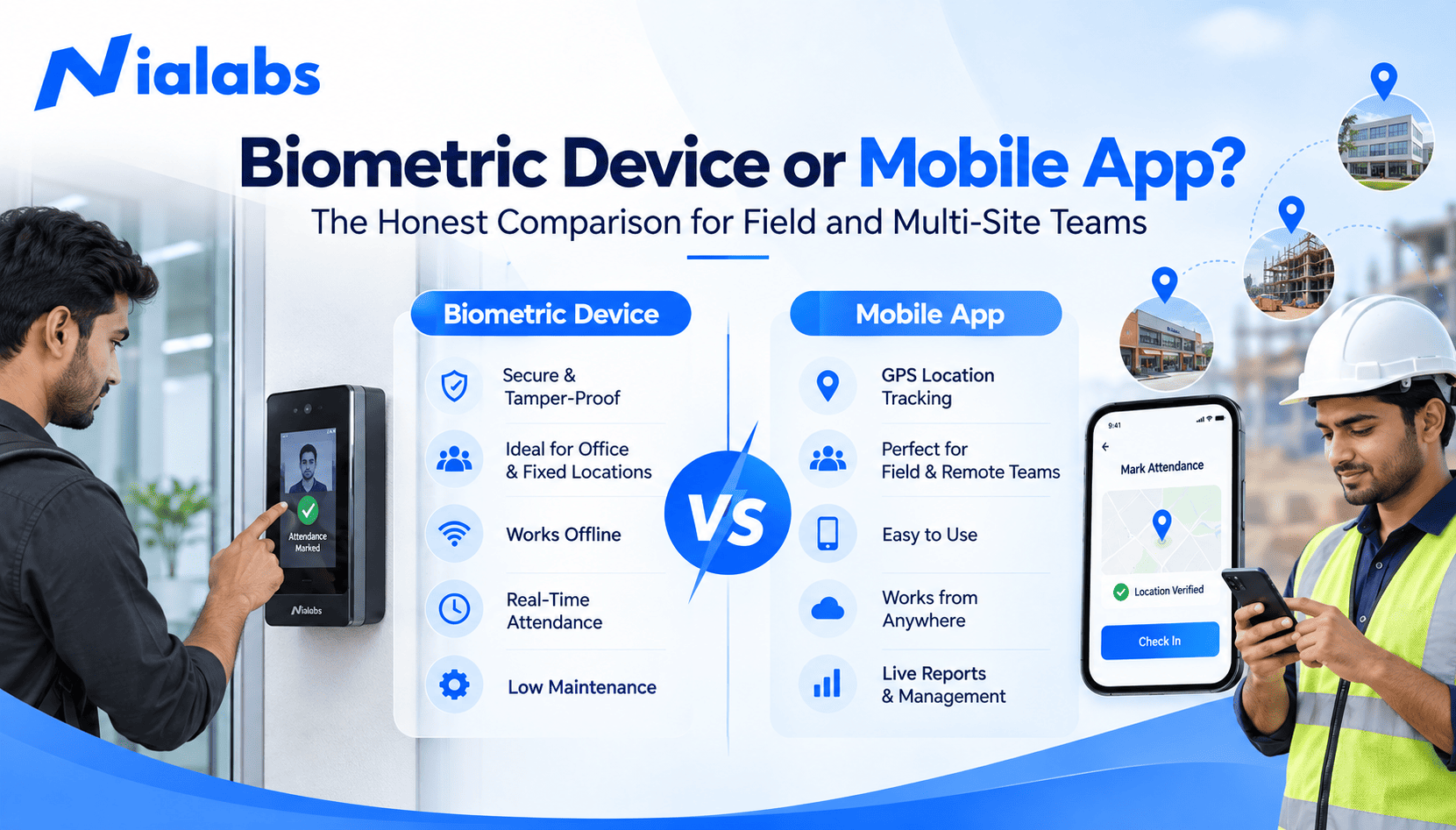
An employee can be identified by a biometric device, such as face recognition, fingerprint, or RFID scan. Employees can punch in on a mobile device using the attendance app. With GPS and Geofencing attendance, you can record attendance on a smartphone or tablet.
So what is the best attendance system? The honest answer is: it depends on the work environment and what the attendance check-in requires.
What is a Biometric Attendance Device?
A biometric attendance device may identify an employee by means of the following biometric or identification methods: Face recognition; fingerprint recognition; RFID; QR code; face and fingerprint authentication.
Employees swipe at a machine at the same place of work. Data collected from biometric attendance machines can be handled using attendance software for reporting and observation purposes, and for payroll purposes. Biometric machines are very useful when the workers operate from the same place, and there is a need for proper identity verification.
What is a Mobile Attendance App?
A mobile attendance app enables employees to log into an attendance system via a smartphone. If the app offers geolocation, employee login, timestamp, and geofence features, the app can track and report employee attendance. For instance, a construction company can set up a geofence around a worksite and have their employees clock in and clock out with a mobile app when inside the geofence. Mobile attendance is perfect for mobile workers at different worksites.
Biometric Device vs Mobile App: Key Differences
The biggest difference is how attendance is captured and where employees need to be.
|
Factor |
Biometric Device |
Mobile Attendance App |
|
Best suited for |
Fixed workplaces |
Field and mobile teams |
|
Verification |
Face, fingerprint, RFID |
Mobile authentication and location |
|
Location control |
Fixed device location |
GPS and geofencing |
|
Hardware |
Required |
Smartphone based |
|
Field employees |
Less flexible |
Highly suitable |
|
Office employees |
Highly suitable |
Suitable |
|
Multi-site teams |
Requires devices at sites |
More flexible |
|
Proxy attendance |
Strong biometric verification |
Depends on app controls |
When Should You Choose a Biometric Device?
Using a biometric device can be a good option if your employees go to a fixed location.
Offices
Once you have one of our face recognition attendance solutions or fingerprint devices installed, your staff will be able to check in upon arrival at work.
Factories
All factories have their entrances and exits. You can verify your staff by installing a biometric device.
Schools and Institutions
If a school has a fixed campus, then it can deploy a biometric attendance system at its offices.
Warehouses
Businesses can deploy a biometric machine at the entrances for checking the attendance of their office and warehouse employees.
The benefit here is identity verification at one point.
When is a Mobile Attendance App Better?
A mobile attendance system can be more convenient for remote workers.
Sales Teams
Field staff may go from one customer site to another. Mobile attendance provides an easy way for them to clock in and out when out in the field.
Construction Teams
Construction crews may need to work at a different work site for every project. GPS-enabled devices can pinpoint locations for accurate clocking in and out at different sites.
Engineers
Service workers visiting customer locations are able to submit their attendance digitally rather than using a fixed-location attendance machine.
Field & Delivery Staff
Staff working across various locations can submit their presence via their mobile rather than establishing numerous attendance machines.
What Works Better for Multi-Site Teams?
For multi-site companies, there is no single solution that will fit all employees. A business with multiple locations could introduce biometric clocks on the various sites. Although this would act as a physical stamp and time clock for staff to register their attendance, it would mean installing hardware at all locations.
A mobile app might offer more convenience to employees on the move. However, ensure you consider the depth of identity verification, GPS accuracy, geofencing, mobile connectivity, and access security used by the app. Where possible, companies are often better served by both options.
Why Consider a Hybrid Attendance System?
There may not be a need to select biometric attendance software or a mobile app. Some hybrid attendance systems may take a different approach for each worker category. Here are some example options:
· Office worker - face recognition
· Factory worker - fingerprint or face recognition
· Construction team - mobile GPS attendance
· Sales employee - mobile attendance
· Field service team - GPS and geofencing
In this way, it will be possible for enterprises to select the most suitable registration type for all of their employee groups and control the attendance of all employees from one registration system.
What About Proxy Attendance?
Proxy attendance prevention is another important consideration.
Biometric devices: The employee can be verified by their face or fingerprint, and no other individual can mark the attendance of that particular employee.
Mobile presence has different controls. Based on the system, organisations can use GPS, geofencing, authentication, timestamps, and more to control mobile presence misuse.
Thus, companies need to consider how attendance verification is done, whether they go with a device or an application.
Managing Attendance Across Multiple Sites
For companies present on multiple branches, offices, factories, or project sites, a centralised attendance system is crucial. A cloud-based attendance system can assist HR and admin teams in:
· Monitor attendance across locations
· Review employee attendance records
· Track late arrivals and absences
· Manage multiple sites
· Generate attendance reports
A biometric time attendance system that links attendance information to HR and payroll gives you a single view of attendance rather than multiple sources of data.
Biometric Device or Mobile App: Which Fits Your Workforce?
Choose a biometric device when your employees' location is fixed, and you need a high level of confirmation for their identities. Choose a mobile attendance app when your employees are working at various locations, and you want their attendance logged via GPS or geofencing. If your company has both fixed and field teams, you can implement a hybrid attendance system.
How Nialabs Can Help
Nialabs provides a biometric attendance solution built on AI face recognition, with fingerprint, RFID, and mobile GPS attendance. Companies can select the right combination according to their employees and workplaces.
Conclusion
The best option for your organisation depends on your employees' work location and working style. Fixed attendance is ideal for workplaces, but the mobile option is great if your business operates across locations in the field. For those having to manage employees in different locations, both options can be combined.
FAQ
Is a biometric device superior to a mobile attendance app?
Fixed-location employees are best served by biometric devices, while mobile and field workforce can benefit from a mobile attendance app.
Can I track employees using the mobile attendance app?
Mobile app attendance can confirm employees' location using GPS and geofencing.
Is it possible to use both?
Yes, by choosing a hybrid approach that uses biometric devices for fixed locations and the mobile attendance app for field teams.